mirror of
https://github.com/EKKOLearnAI/hermes-web-ui.git
synced 2026-05-25 21:40:13 +00:00
 ekko
ekko
328 lines
14 KiB
Markdown
328 lines
14 KiB
Markdown
<p align="center">
|
|
<strong>Hermes Web UI</strong>
|
|
<a href="./README_zh.md">中文</a>
|
|
</p>
|
|
|
|
<p align="center">
|
|
A full-featured web dashboard for <a href="https://github.com/NousResearch/hermes-agent">Hermes Agent</a>.<br/>
|
|
Manage AI chat sessions, monitor usage & costs, configure platform channels,<br/>
|
|
schedule cron jobs, browse skills — all from a clean, responsive web interface.
|
|
</p>
|
|
|
|
<p align="center">
|
|
<code>npm install -g hermes-web-ui && hermes-web-ui start</code>
|
|
</p>
|
|
|
|
<p align="center">
|
|
<img src="https://github.com/EKKOLearnAI/hermes-web-ui/blob/main/packages/client/src/assets/image1.png" alt="Hermes Web UI Demo" width="680"/>
|
|
</p>
|
|
|
|
<p align="center">
|
|
<img src="https://github.com/EKKOLearnAI/hermes-web-ui/blob/main/packages/client/src/assets/image2.png" alt="Hermes Web UI Demo" width="680"/>
|
|
</p>
|
|
|
|
<p align="center">
|
|
<a href="https://www.npmjs.com/package/hermes-web-ui"><img src="https://img.shields.io/npm/v/hermes-web-ui?style=flat-square&color=blue" alt="npm version"/></a>
|
|
<a href="https://github.com/EKKOLearnAI/hermes-web-ui/blob/main/LICENSE"><img src="https://img.shields.io/npm/l/hermes-web-ui?style=flat-square" alt="license"/></a>
|
|
<a href="https://github.com/EKKOLearnAI/hermes-web-ui/stargazers"><img src="https://img.shields.io/github/stars/EKKOLearnAI/hermes-web-ui?style=flat-square" alt="stars"/></a>
|
|
</p>
|
|
|
|
---
|
|
|
|
## Features
|
|
|
|
### AI Chat
|
|
|
|
- Real-time chat streaming over Socket.IO `/chat-run`; chat runs execute through the Hermes agent bridge
|
|
- Multi-session management — create, rename, delete, switch between sessions
|
|
- **Self-built session database** — local SQLite storage for Web UI sessions; Hermes state.db remains a read-only source for Hermes history APIs
|
|
- Session grouping by source (Telegram, Discord, Slack, etc.) with collapsible accordion
|
|
- Active session indicator — live sessions pin to top with spinner icon
|
|
- Sessions sorted by latest message time
|
|
- Markdown rendering with syntax highlighting and code copy
|
|
- Tool call detail expansion (arguments / result)
|
|
- Profile-scoped file uploads
|
|
- File download support — download uploaded files and agent-generated files by resolved path across local, Docker, SSH, and Singularity backends
|
|
- Session search — Ctrl+K search across the Web UI local session database; read-only Hermes history sessions are not included
|
|
- Profile-aware model selector — discovers models available to the signed-in account through authorized Hermes profiles
|
|
- Per-session model display badge and context token usage
|
|
|
|
### Platform Channels
|
|
|
|
Unified configuration for **8 platforms** in one page:
|
|
|
|
| Platform | Features |
|
|
| ------------- | ---------------------------------------------------------------------- |
|
|
| Telegram | Bot token, mention control, reactions, free-response chats |
|
|
| Discord | Bot token, mention, auto-thread, reactions, channel allow/ignore lists |
|
|
| Slack | Bot token, mention control, bot message handling |
|
|
| WhatsApp | Enable/disable, mention control, mention patterns |
|
|
| Matrix | Access token, homeserver, auto-thread, DM mention threads |
|
|
| Feishu (Lark) | App ID / Secret, mention control |
|
|
| WeChat | QR code login (scan in browser, auto-save credentials) |
|
|
| WeCom | Bot ID / Secret |
|
|
|
|
- Credential management writes to `~/.hermes/.env`
|
|
- Channel behavior settings write to `~/.hermes/config.yaml`
|
|
- Per-platform configured/unconfigured status detection
|
|
|
|
### Usage Analytics
|
|
|
|
- Total token usage breakdown (input / output)
|
|
- Session count with daily average
|
|
- Estimated cost tracking & cache hit rate
|
|
- Model usage distribution chart
|
|
- 30-day daily trend (bar chart + data table)
|
|
|
|
### Scheduled Jobs
|
|
|
|
- Create, edit, pause, resume, delete cron jobs
|
|
- Trigger immediate execution
|
|
- Cron expression quick presets
|
|
|
|
### Model Management
|
|
|
|
- Auto-discover models from credential pool (`~/.hermes/auth.json`)
|
|
- Fetch available models from each provider endpoint (`/v1/models`)
|
|
- Add, update, and delete providers (preset & custom OpenAI-compatible)
|
|
- OpenAI Codex & Nous Portal OAuth login
|
|
- Provider URL auto-detection for non-v1 API versions (e.g. `/v4`)
|
|
- Provider-level model grouping with default model switching
|
|
|
|
### Multi-Profile
|
|
|
|
- Create, rename, delete, and switch between Hermes profiles
|
|
- Clone existing profile or import from archive (`.tar.gz`)
|
|
- Export profile for backup or sharing
|
|
- Profile-scoped configuration, cache, uploads, sessions, jobs, usage, memory, skills, plugins, providers, and model visibility
|
|
- Account-bound profile access: super administrators can manage every profile; regular administrators only see and use profiles assigned to their account
|
|
|
|
### File Browser
|
|
|
|
- Browse files on remote backends (local, Docker, SSH, Singularity)
|
|
- Upload, download, rename, copy, move, and delete files
|
|
- Store uploaded files under the selected/requested Hermes profile while keeping downloads path-based for agent-generated artifacts outside the upload directory
|
|
- Create directories
|
|
- View file content with syntax highlighting
|
|
|
|
### Group Chat
|
|
|
|
- Multi-agent chat rooms with real-time messaging via Socket.IO
|
|
- @mention routing — mention an agent to trigger a contextual reply
|
|
- Context compression — automatic conversation summarization when history exceeds token threshold
|
|
- Typing status and reply progress indicators
|
|
- Room creation, deletion, and invite code management
|
|
- Agent management — add/remove agents from rooms with per-agent profiles
|
|
- SQLite message persistence
|
|
- Mobile responsive with collapsible sidebar
|
|
|
|
### Skills & Memory
|
|
|
|
- Browse and search installed skills
|
|
- View skill details and attached files
|
|
- User notes and profile management
|
|
|
|
### Logs
|
|
|
|
- View agent / server / error logs
|
|
- Filter by log level, log file, and keyword
|
|
- Structured log parsing with HTTP access log highlighting
|
|
|
|
### Authentication
|
|
|
|
- Token-based auth (auto-generated on first run or set via `AUTH_TOKEN` env var)
|
|
- Username/password login with account management in Settings
|
|
- Default bootstrap credentials are `admin` / `123456`; users are prompted after login to change the default username and password
|
|
- Super administrators can manage users and profile bindings; regular administrators can manage their own account details
|
|
- Auth can be disabled with `AUTH_DISABLED=1`
|
|
|
|
CLI maintenance commands:
|
|
|
|
```bash
|
|
# Delete persisted login IP lock records
|
|
hermes-web-ui clear-login-locks
|
|
|
|
# Delete login locks and restart the running Web UI process
|
|
hermes-web-ui clear-login-locks --restart
|
|
|
|
# Create or reset the default super administrator login to admin / 123456
|
|
hermes-web-ui reset-default-login
|
|
```
|
|
|
|
`clear-login-locks` removes `${HERMES_WEB_UI_HOME:-~/.hermes-web-ui}/.login-lock.json`. If the server is running, restart it to clear in-memory lock state. `reset-default-login` updates the Web UI account database; if an `admin` user already exists, its password is reset to `123456` and the account is enabled as a super administrator.
|
|
|
|
### Settings
|
|
|
|
- Display (streaming, compact mode, reasoning, cost display)
|
|
- Agent (max turns, timeout, tool enforcement)
|
|
- Memory (enable/disable, char limits)
|
|
- Session reset (idle timeout, scheduled reset)
|
|
- Privacy (PII redaction)
|
|
- Model settings (default model & provider)
|
|
- Profile and provider configuration
|
|
|
|
### Web Terminal
|
|
|
|
- Integrated terminal powered by node-pty and @xterm/xterm
|
|
- Multi-session support — create, switch between, and close terminal sessions
|
|
- Real-time keyboard input and PTY output streaming via WebSocket
|
|
- Window resize support
|
|
|
|
---
|
|
|
|
## Quick Start
|
|
|
|
### npm (Recommended)
|
|
|
|
```bash
|
|
npm install -g hermes-web-ui
|
|
hermes-web-ui start
|
|
```
|
|
|
|
Open **http://localhost:8648**
|
|
|
|
### One-line Setup (Auto-detect OS)
|
|
|
|
Automatically installs Node.js (if missing) and hermes-web-ui on Debian/Ubuntu/macOS:
|
|
|
|
```bash
|
|
bash <(curl -fsSL https://raw.githubusercontent.com/EKKOLearnAI/hermes-web-ui/main/scripts/setup.sh)
|
|
```
|
|
|
|
### WSL
|
|
|
|
```bash
|
|
bash <(curl -fsSL https://raw.githubusercontent.com/EKKOLearnAI/hermes-web-ui/main/scripts/setup.sh)
|
|
hermes-web-ui start
|
|
```
|
|
|
|
> WSL uses the same Web UI daemon startup flow as other local installs; no separate gateway service is started by Web UI.
|
|
|
|
### Docker Compose
|
|
|
|
Single-container deployment with integrated Hermes Agent:
|
|
|
|
```bash
|
|
# Use pre-built image (Recommended)
|
|
WEBUI_IMAGE=ekkoye8888/hermes-web-ui docker compose up -d
|
|
|
|
# Or build from source
|
|
docker compose up -d --build
|
|
|
|
docker compose logs -f hermes-webui
|
|
```
|
|
|
|
Open **http://localhost:6060**
|
|
|
|
- Persistent Hermes data is stored in `./hermes_data`
|
|
- Web UI auth token is stored in `./hermes_data/hermes-web-ui/.token`
|
|
- On first run with auth enabled, the token is printed to container logs
|
|
- All runtime settings are environment-variable driven in `docker-compose.yml`
|
|
|
|
For detailed notes and troubleshooting, see [`docs/docker.md`](./docs/docker.md).
|
|
|
|
### Hermes Agent Runtime Discovery
|
|
|
|
When Web UI starts backend chat features, it prefers a source checkout that
|
|
contains `run_agent.py` such as `~/.hermes/hermes-agent`. If no source checkout
|
|
is found, it falls back to the Python environment used by the installed
|
|
`hermes` command, then the system Python. This supports both source installs
|
|
and package installs such as `pip install hermes-agent`.
|
|
|
|
## Web UI Environment Variables
|
|
|
|
These variables configure Hermes Web UI itself. Provider API keys and Hermes Agent settings are managed separately through Hermes profiles.
|
|
|
|
| Variable | Default | Description |
|
|
| --- | --- | --- |
|
|
| `PORT` | `8648` | Web UI listen port. |
|
|
| `BIND_HOST` | `0.0.0.0` | Web UI bind host. Set `::` explicitly for IPv6. |
|
|
| `HERMES_WEB_UI_HOME` | `~/.hermes-web-ui` | Web UI data home for auth token, credentials, logs, DB, and default uploads. `HERMES_WEBUI_STATE_DIR` is also supported as a compatibility alias. |
|
|
| `UPLOAD_DIR` | `$HERMES_WEB_UI_HOME/upload` | Upload root override. Files are stored below profile-scoped subdirectories. |
|
|
| `CORS_ORIGINS` | `*` | Koa CORS origin setting. |
|
|
| `AUTH_DISABLED` | unset | Set to `1` or `true` to disable Web UI auth. |
|
|
| `AUTH_TOKEN` | auto-generated | Explicit bearer token. If unset, Web UI creates one under `HERMES_WEB_UI_HOME`. |
|
|
| `PROFILE` | `default` | Startup/default Hermes profile. Runtime requests use the profile selected by the frontend and authorized for the current account. |
|
|
| `LOG_LEVEL` | `info` | Server log level. |
|
|
| `BRIDGE_LOG_LEVEL` | `$LOG_LEVEL` or `info` | Bridge log level. |
|
|
| `MAX_DOWNLOAD_SIZE` | `200MB` | Maximum file download size. |
|
|
| `MAX_EDIT_SIZE` | `10MB` | Maximum editable file size. |
|
|
| `WORKSPACE_BASE` | `/opt/data/workspace` | Base directory for workspace browsing. |
|
|
|
|
### CLI Commands
|
|
|
|
| Command | Description |
|
|
| --------------------------------- | ---------------------------------- |
|
|
| `hermes-web-ui start` | Start in background (daemon mode) |
|
|
| `hermes-web-ui start --port 9000` | Start on custom port |
|
|
| `hermes-web-ui stop` | Stop background process |
|
|
| `hermes-web-ui restart` | Restart background process |
|
|
| `hermes-web-ui status` | Check if running |
|
|
| `hermes-web-ui update` | Update to latest version & restart |
|
|
| `hermes-web-ui upgrade` | Alias for `update` |
|
|
| `hermes-web-ui -v` | Show version number |
|
|
| `hermes-web-ui -h` | Show help message |
|
|
|
|
`update` / `upgrade` first attempt `npm cache clean --force`, then run `npm install -g hermes-web-ui@latest` and restart. Cache cleanup is best-effort; if it fails, the updater continues with the install.
|
|
|
|
### Auto Configuration
|
|
|
|
On startup the BFF server automatically:
|
|
|
|
- Initializes Web UI data directories, local databases, and bundled skills
|
|
- Starts the Hermes agent bridge used by `/chat-run`
|
|
- Opens browser on successful startup
|
|
|
|
---
|
|
|
|
## Development
|
|
|
|
```bash
|
|
git clone https://github.com/EKKOLearnAI/hermes-web-ui.git
|
|
cd hermes-web-ui
|
|
npm install
|
|
npm run dev
|
|
```
|
|
|
|
- Frontend: http://localhost:5173
|
|
- BFF Server: http://localhost:8648
|
|
|
|
```bash
|
|
npm run build # outputs to dist/
|
|
```
|
|
|
|
See [DEVELOPMENT.md](./DEVELOPMENT.md) for project development guidelines.
|
|
|
|
## Architecture
|
|
|
|
```
|
|
Browser → BFF (Koa, :8648) → Socket.IO /chat-run
|
|
↓
|
|
Hermes agent bridge → Hermes Agent runtime
|
|
↓
|
|
Hermes CLI / profiles
|
|
profile config.yaml (channel/provider behavior)
|
|
profile auth.json (credential pool)
|
|
Tencent iLink API (WeChat QR login)
|
|
```
|
|
|
|
The frontend is designed with **multi-agent extensibility** — all Hermes-specific code is namespaced under `hermes/` directories (API, components, views, stores), making it straightforward to add new agent integrations alongside.
|
|
|
|
The BFF layer handles Socket.IO chat streaming, the Hermes agent bridge, profile-aware file upload and path-based download (multi-backend: local/Docker/SSH/Singularity), session CRUD, account- and profile-scoped management, config/credential management, WeChat QR login, model discovery, skills/memory management, log reading, and static file serving.
|
|
|
|
## Tech Stack
|
|
|
|
**Frontend:** Vue 3 + TypeScript + Vite + Naive UI + Pinia + Vue Router + vue-i18n + SCSS + markdown-it + highlight.js
|
|
|
|
**Backend:** Koa 2 (BFF server) + node-pty (web terminal)
|
|
|
|
## Star History
|
|
|
|
[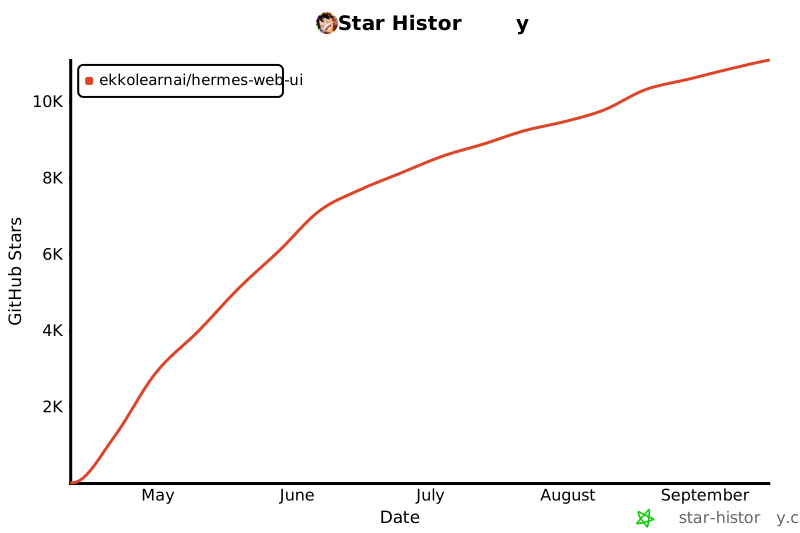](https://star-history.com/#EKKOLearnAI/hermes-web-ui&Date)
|
|
|
|
<!-- If the chart above doesn't load, visit https://star-history.com/#EKKOLearnAI/hermes-web-ui -->
|
|
|
|
## License
|
|
|
|
[BSL-1.1](./LICENSE)
|